
- Posted on
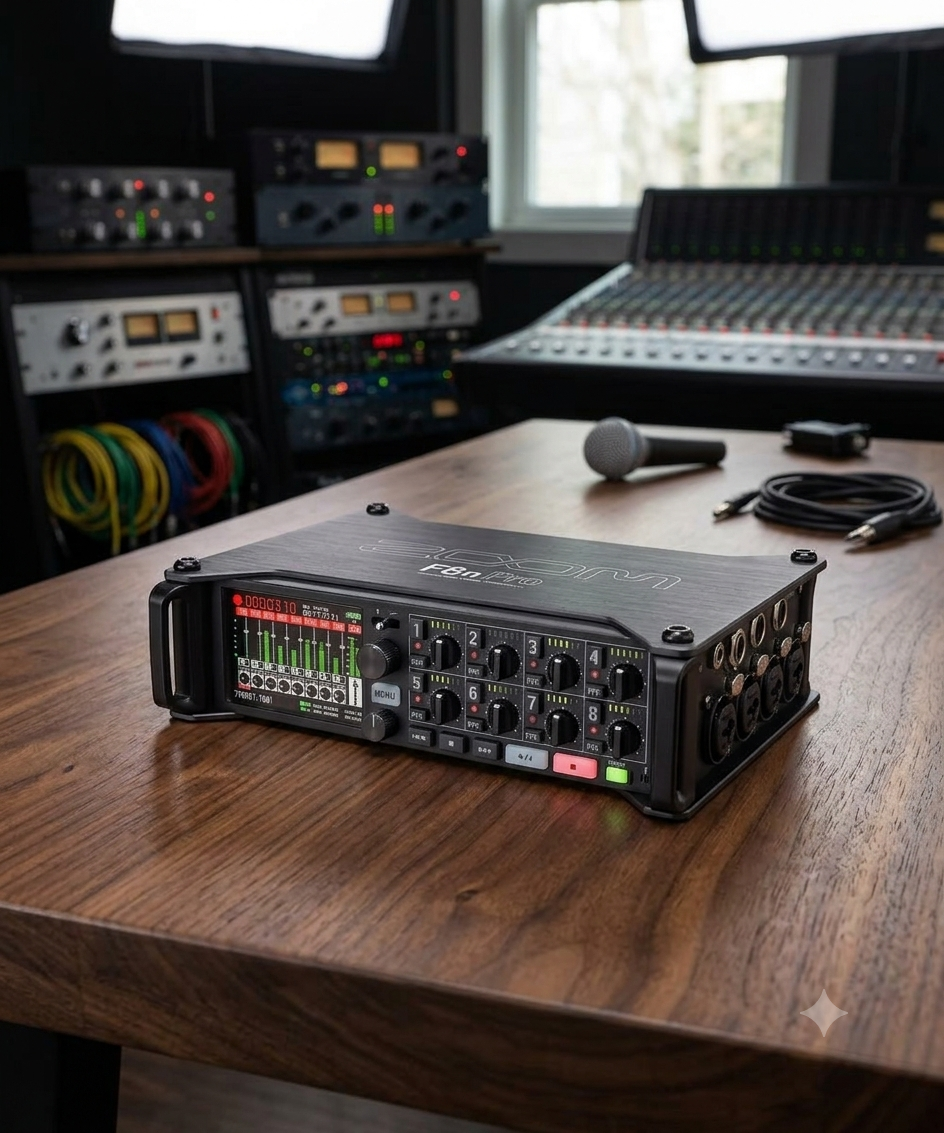
Virtues, Vices, and 32-Bit Float: Is the Zoom F8n Pro Still the Value Heavyweight?
Introduction
For years, the location sound industry was divided into two distinct tiers: ultra-affordable, prosumer handy recorders and multi-thousand-dollar elite field mixers. When Zoom launched the F-series, they intentionally broke that barrier. The Zoom F8n Pro represents the peak of this evolution.
By marrying high-channel capacity with dual A/D converters and 32-bit float recording, the F8n Pro promises bulletproof audio that cannot clip. But is it a true replacement for a high-end production bag, or are there hidden workflow compromises? Let’s break down the virtues and drawbacks of this field recording powerhouse. (B&H)
The Virtues (The Pros)
1. 32-Bit Float: Bulletproof Dynamic Range The headline feature of the "Pro" moniker is the dual analog-to-digital (A/D) converters paired with 32-bit float recording.
- What it means: You essentially no longer have to set input gain to prevent digital clipping.
- The Reality: If a scene transitions from a quiet whisper to a sudden explosion, the F8n Pro captures the entire waveform without distortion. Even if the file looks clipped in your DAW, pulling down the gain slider recovers the audio perfectly. For solo shooters or fast-moving indie sets, this is an absolute lifesaver. (Sweetwater)
2. Form Factor and Build Quality
Unlike the smaller MixPre series, which often places crucial knobs on the side, the F8n Pro is built strictly for a sound bag configuration.
- All 8 locking Neutrik XLR/TRS combo jacks are cleanly split on the sides (Channels 1–4 on the left, 5–8 on the right).
- The front panel remains clear for channel knobs, LED meters, and the crisp, highly visible color display.
- The aluminum chassis feels rugged enough to take "into battle" on demanding field shoots.
3. Comprehensive Timecode
Timecode is the barrier to entry for professional film sets, and Zoom nailed it here. The F8n Pro utilizes a temperature-compensated crystal oscillator (TCXO) that generates timecode accurate to 0.2 ppm. Crucially, it holds its clock for up to two hours after being powered down—meaning you can swap batteries at lunch without losing sync with your cameras. (Wav.Report)
4. Advanced Software Tools: AutoMix and Ambisonics
The inclusion of an AutoMix algorithm automatically adjusts the gain of active vs. inactive microphones. This is a massive time-saver for multi-person podcasts or panel discussions, significantly reducing background spill and room tone phase issues in real time. For VR and spatial audio designers, it also handles internal Ambisonic decoding seamlessly. (AudioTechnology)
The Drawbacks (The Cons)
1. Ergonomics: Tiny Knobs for Big Hands While the layout is structurally great for a bag, the physical control knobs are undeniably minuscule.
- Adjusting individual channel levels or riding faders on a fast-paced set can feel incredibly fiddly, especially if you are wearing gloves.
- The Fix: To get true physical mixing capabilities, you almost have to buy the external Zoom F-Control (FRC-8) mixing desk, adding bulk and cost to your setup.
2. Comms, Routing, and Output Ecosystem This is where the line between "indie tool" and "Hollywood standard" becomes clear.
Outputs: The F8n Pro uses a mix of TA3 connectors for its main outputs and a single 3.5mm jack for its sub-outputs. For complex sets requiring multiple distinct monitoring feeds (e.g., separate mixes for the Director, Script Supervisor, and Boom Operator), the routing matrix can quickly become limiting.
Comms: Setting up internal communication or a dedicated talkback/private line loop to your boom op through the F8n Pro requires complex workarounds compared to higher-end sound mixers.
3. The Digital Signal Path Catch-22 Because the unit relies on digital processing for its high-pass filters and limiters, your analog microphone signal is converted to digital before these filters are applied. While the 32-bit float system mitigates clipping issues, purists note that you lack the warm, analog limiter stage found in premium competitors. (Reddit)
4. Bizarre Input Layout A minor but persistent annoyance for veteran audio engineers is Zoom’s layout sequence. When looking at the left panel, the inputs read from right to left rather than left to right. It breaks decades of muscle memory and can lead to minor confusion when patching cables in a dark bag.
Power Infrastructure and Rigging: The Three-Way Lifeline In location sound, power failure is the ultimate sin. Zoom engineered the F8n Pro with an exceptionally flexible power infrastructure, borrowing a page directly from high-end sound carts. It utilizes a tri-tier power management system that allows seamless fallovers.

1. The Pro Standard: Hirose 4-Pin DC Input For serious bag setups, the inclusion of a dedicated HIROSE HR10A-7R-4S 4-pin connector is a major selling point. (ZOOM)
- The Specs: It accepts a wide input voltage range of 9V to 18V DC.
- The Workflow: This allows you to integrate the F8n Pro directly into a professional distribution system (like an eSMART, Remote Audio BDS, or an NP-1/smart battery system).
- The Smart Failover: The recorder features an internal, software-controlled voltage threshold setup. If your external smart battery runs dry, the F8n Pro automatically and silently drops back onto its internal power array without dropping a single sample of audio.
2 The Internal Array: 8x AA Batteries When you don't want to rig up an external power distribution system, or if you need an absolute fail-safe backup, the bottom of the chassis features a slide-out sled accommodating 8 AA batteries.
- Crucial Tip: You must manually select your battery chemistry in the system menu (Alkaline, NiMH, or Lithium) so the unit can accurately calculate the remaining voltage curve and warn you before shutting down.
3. AC Power For desktop use, podcast studios, or cart setups near mains power, it ships with the Zoom AD-19 (12V DC, 2A) barrel plug adapter.
Real-World Power Draw & Battery Life Benchmarks The F8n Pro has a maximum total power consumption rating of 15W. However, its actual battery performance scales drastically depending on how hard you push the digital signal processing, how many preamps are active, and whether you are forcing the unit to supply 48V phantom power. (Markertek)
Here is what you can realistically expect from a fresh set of 8 AA batteries:
| Setup / Rigging Scenario | Alkaline AAs | NiMH AAs (2500 mAh) | Lithium AAs |
|---|---|---|---|
| Light Load | ~6 to 7 hours | ~8 to 8.5 hours | ~12 to 13.5 hours |
| (2 Channels, 48kHz, Phantom OFF, Timecode OFF, Screen Low) | |||
| Standard Film Set Load | ~4.5 to 5 hours | ~6 to 7 hours | ~9.5 to 10 hours |
| (8 Channels, 48kHz, Phantom OFF, Screen Medium) | |||
| Maximized Field Load | ~30 mins | ~1 to 1.5 hours | ~2 to 2.5 hours|~9.5 to 10 hours |
| (8 Channels, 144kHz/192kHz, All Phantom 48V ON, Timecode Free Run, Screen Bright) |
⚠️ Pro-Tip for the Field Running 8 channels with continuous 48V phantom power at 192kHz sample rates will chew through standard Alkaline AA batteries in roughly 30 minutes. If you are tracking a heavy musical ensemble or a complex ambient soundscape in high resolution, avoid AAs entirely and run a high-capacity LiFePO4 or Lithium-ion pack via the Hirose input. A standard 48Wh external battery pack can easily push the F8n Pro past 12 to 14 hours of continuous multi-channel runtime.
Feature Comparison Table
| Feature | Zoom F8n Pro | Standard Pro Competition (e.g., Sound Devices 8-Series) |
|---|---|---|
| Price Point | ~$700 - $1,000 | $4,000+ |
| Resolution | Up to 32-bit Float / 192 kHz | Up to 32-bit Float / 192 kHz |
| Preamps | Clean, low-noise (+75dB max gain) | Ultra-premium, discrete analog topologies |
| Routing Flexibility | Moderate (Main TA3 + Sub 3.5mm) | Complex (Multiple independent buses/XLR/TA3) |
| Comms / Talkback | Limited / Basic Slate Mic | Limited / Basic Slate Mic |
App Control & Metadata: Solving the Ergonomic Problem?
While the F8n Pro’s miniature physical knobs can be a bottleneck on set, Zoom offers a remarkably seamless software solution to bypass them entirely: the F8 Control App (available for iOS and Android). (Google Play) By connecting to the recorder via built-in Bluetooth LE, your smartphone or tablet essentially transforms into a high-resolution, large-scale wireless monitoring control surface.
1. Remote Mixing and Level Monitoring Instead of fumbling with the tiny dial layout on the front panel, the app gives you a highly responsive, multi-touch mixer screen. You can effortlessly adjust trim levels, pan settings, and track faders on the fly. (Apple App Store)
- The Workflow Advantage: This means you can keep the F8n Pro securely zipped up inside a protective weather-proof sound bag while managing your entire mix comfortably from a phone clipped to your harness or a tablet mounted on a stand.
2. High-Speed iXML Metadata Entry Entering metadata via a push-and-turn encoder knob on a tiny recorder screen is a notorious form of cognitive torture on set. The F8 Control App fixes this by unlocking your mobile device's native touch keyboard.
You can instantly type out complex scene numbers, track names, notes, and circle takes into the broadcast-standard iXML metadata architecture.
Having clean, accurately labeled audio files that mirror the camera’s slate format saves your editor hours of tracking in post-production. The app also lets you sync the recorder’s internal date and time clock directly to your device with a single tap.
Conclusion: The Final Verdict
The Zoom F8n Pro is an undisputed value champion. If you are an indie filmmaker, documentarian, corporate video producer, or immersive sound designer, this machine offers roughly 90% of the field performance of an elite-tier recorder at a fraction of the cost. The dual-converter 32-bit float safety net alone makes it a bulletproof investment for fast-moving crews.
However, if your daily workload consists of high-track-count narrative television, complex commercial sets requiring heavy real-time comms routing, or extensive camera hops, the hardware’s physical scaling limits will eventually push you toward a premium upgrade. But until you reach that high-budget threshold, the F8n Pro remains the ultimate power-to-price heavy lifter in location audio.
For a visual walkthrough on utilizing these tools in a production environment, you can check out this guide on Working On a Film or Theatre Set with the Zoom F8n Pro Control App, which demonstrates how utilizing a tablet interface speeds up workflow when the hardware is tucked away inside an audio bag.