Inside Audio

arx2

All posts tagged arx2 by Inside Audio
  • Posted on
    Seamless Synchronization: Integrating the Astral ARX2 with the A20-TX

    Seamless Synchronization: Integrating the Astral ARX2 with the A20-TX

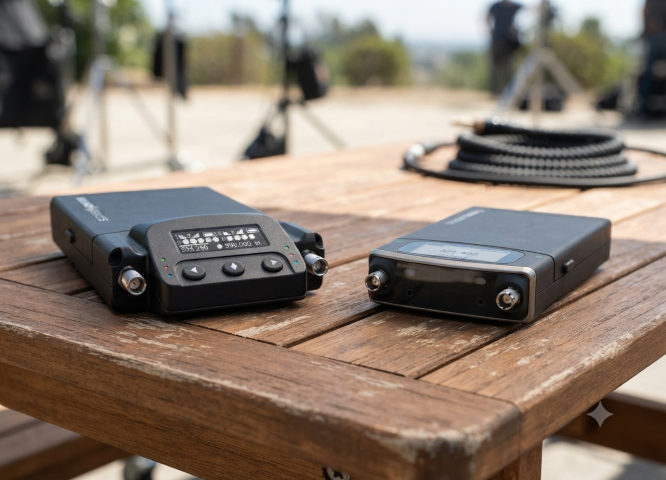
    The true power of the Sound Devices Astral ecosystem is realized when the ARX2 receiver is paired with the A20-TX transmitter. While the ARX2 handles the heavy lifting of signal reception, the A20-TX brings a unique set of technical advantages that simplify the workflow for the boom operator or talent.

    Here is how these two units work in tandem to create a robust, high-fidelity wireless link.

    1. Unified Gain Management with GainForward

    The most significant operational advantage when pairing the ARX2 with the A20-TX is the GainForward architecture.

    Traditionally, sound mixers have had to set the gain at the transmitter (often buried under wardrobe) and then trim it again at the mixer. With the ARX2 and A20-TX, you set the gain once at the receiver or directly from your 8-Series mixer. Any subsequent adjustments made on the mixer are effectively managing the transmitter’s internal preamp stage.

    2. Full Control via Remote

    The ARX2 acts as a central command hub for the A20-TX. When paired, you can remotely control essential transmitter settings directly from the receiver interface or your 8-Series mixer, including:

    • RF Power Levels: Toggle between output powers to conserve battery or boost range as needed.

    • Input Mute: Remotely kill the mic signal for talent privacy or to avoid unwanted audio during scene changes.

    • A20-TX Sleep Mode: Conserve precious battery life between takes by putting the transmitter into sleep mode remotely, then waking it back up just before the director calls "Action."

    3. Digital Transmission and Latency

    The A20-TX transmits a full-range, 100% digital signal that integrates seamlessly with the ARX2’s processing chain. Because the entire path is digital—from the A20-TX preamp to the ARX2 output—there is no need for traditional analog companding.

    • Latency: The system provides extremely low, fixed-latency performance, which is vital when mixing talent on a wireless lavalier that may be audible alongside a boom microphone in the same scene. This prevents the "comb filtering" or phasing issues that can occur with variable-latency digital wireless systems.

    4. Shared Metadata and Status Monitoring

    Integration goes beyond just audio. The ARX2 receives telemetry data from the A20-TX, which is displayed directly on your monitoring screen:

    • Battery Status: Real-time, accurate battery life remaining.

    • RF Signal Integrity: Visual indicators of signal strength (RSSI) and link quality, allowing you to proactively move antennas or reposition talent before a drop-out occurs.

    • Frequency Coordination: The ARX2 can push frequency changes to the A20-TX automatically, ensuring both units remain locked to the same channel without manual entry on the transmitter.

    Pro-Tip for Configuration

    When pairing your A20-TX to the ARX2, ensure you are utilizing the A20-Remote app if you are moving between different setups. The app allows for rapid deployment and firmware management, ensuring that your A20-TX units are always optimized for the specific modulation and frequency hopping patterns required by the ARX2 in your specific region.

    Quick Start: Pairing the A20-TX to the ARX2

    Getting your transmitter and receiver linked and ready for production is a straightforward process. Follow these steps to establish a secure, digital link between your A20-TX and ARX2.

    Step 1: Set the Frequency on the ARX2

    • Navigate to the Receiver Menu on your ARX2 (or via your 8-Series mixer display).

    • Select the desired channel you wish to pair.

    • Choose a clear frequency using the AutoAssign feature or by manual selection to ensure the channel is free from interference.

    Step 2: Initiate Pairing Mode on the A20-TX

    • Ensure your A20-TX is powered on.

    • Locate the Pairing Button (typically found on the side or within the menu interface depending on your firmware version).

    • Press and hold the button until the status LED begins to flash in a specific "pairing" pattern (usually a rapid pulse), indicating the unit is ready to receive data.

    Step 3: Sync via the ARX2

    • While the A20-TX is in pairing mode, navigate to the Pairing/Sync menu on your ARX2.

    • Select "Start Sync" (or the equivalent command on your mixer interface).

    • The ARX2 will transmit the frequency, modulation, and metadata settings to the A20-TX wirelessly.

    Step 4: Verify the Link

    • Once the sync is successful, the status LED on the A20-TX will change to a solid state (typically green or blue, indicating a locked link).

    • Observe the ARX2 receiver display. You should see the RF signal meter climb to full strength and the audio modulation meter reacting to sound input at the A20-TX microphone.

    • Perform a quick "walk test" to confirm audio clarity and consistent signal strength in your environment.

    Note: If the sync fails, ensure both units are updated to the latest firmware version. Using the A20-Remote app can also provide a visual confirmation that the transmitter has successfully adopted the new frequency parameters from the receiver.

    👉 Return to RR.COM 👈
  • Posted on
    Redefining Wireless Flexibility: A Deep Dive into the Sound Devices Astral ARX2

    Redefining Wireless Flexibility: A Deep Dive into the Sound Devices Astral ARX2

    In the ever-crowded RF environments of modern production, the ability to find a clear, reliable signal is more than a convenience—it’s a necessity. As wireless spectrum continues to shrink, Sound Devices has pushed the boundaries of portable wireless reception with the Astral ARX2.

    Designed for location sound professionals who demand high-performance, true-diversity reception in a compact, slot-in form factor, the ARX2 stands as a testament to engineering efficiency. (Sound Devices)

    The Power of SpectraBand

    The headline feature of the ARX2 is its implementation of SpectraBand technology. By providing an expansive tuning range of 470 MHz – 1525 MHz, the ARX2 effectively solves the "band-locking" dilemma that has plagued field sound engineers for years.

    Instead of juggling multiple receivers for specific regional frequency blocks, the ARX2 allows operators to quickly jump between the standard UHF TV bands and the increasingly popular 900 MHz ISM/STL bands, or even the 1.5 GHz AFTRCC band (where licensed). This agility is a game-changer for international productions or setups in highly congested metropolitan areas.

    Technical Highlights

    Beyond its broad tuning range, the ARX2 is built for the rigors of professional field work:

    • True Diversity Topology: The ARX2 utilizes two complete RF receivers per channel, providing four total receivers to ensure robust, dropout-free performance in challenging multi-path environments.

    • Brick-Wall SAW Filtering: To mitigate interference from nearby high-power sources like IFB or camera hops, the ARX2 employs low-loss, brick-wall Surface Acoustic Wave (SAW) filters. This high-discrimination front end maintains signal integrity without the need for bulky external filters.

    • GainForward Architecture: By utilizing Sound Devices’ GainForward, engineers can control transmitter gain directly from the receiver or the 8-Series mixer-recorder interface. This eliminates the need to physically access the transmitter during a take, streamlining the workflow significantly.

    • AutoAssign Functionality: When time is short, the AutoAssign feature scans the local RF environment and automatically suggests, selects, and sets the best available frequencies, reducing setup times from minutes to mere seconds.

    Integration and Connectivity

    The ARX2 is engineered for seamless integration into the Sound Devices ecosystem. It is fully SuperSlot compatible, meaning it slides effortlessly into an SL-2 module docked to an 8-Series mixer-recorder, allowing for power, audio, and control over a single connection.

    For those operating outside the 8-Series environment, the ARX2 supports a variety of connectivity options, including XLR and TA3 adapters, and the A-15PIN two-channel AES Sony camera slot adapter, ensuring it remains a versatile tool in any kit.

    The Portable Advantage: Integrating the A-XLR

    enter image description here

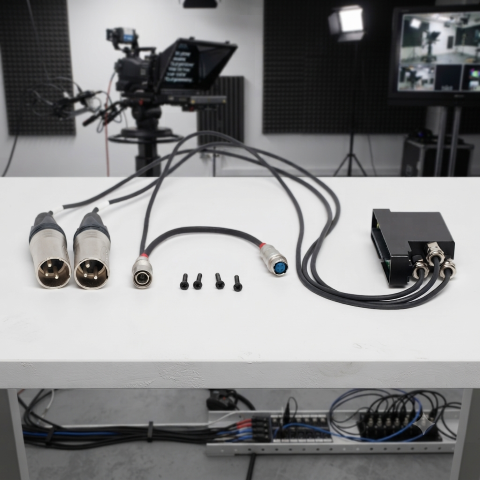
    For smaller setups or "run-and-gun" kits where a full 8-Series mixer and SL-2 module might be overkill, the Sound Devices A-XLR provides a vital bridge for the Astral ARX2. This compact adapter allows you to take the ARX2 out of the slot-in environment and into a standalone configuration, transforming it into a high-performance, two-channel receiver that fits easily into a smaller bag or shoulder rig. By providing secure XLR outputs and reliable power via the Hirose connector, the A-XLR ensures that you don't have to compromise on signal quality or the advanced features of the Astral ecosystem just because you’ve opted for a more mobile, minimalist kit. Whether you're feeding a compact mirrorless camera or a portable field recorder, the A-XLR maintains the integrity of the digital link, making it the perfect solution for solo operators who need professional-grade wireless in a low-profile footprint.

    Integrating the Astral ARX2 with the A20-TX

    The true power of the Sound Devices Astral ecosystem is realized when the ARX2 receiver is paired with the A20-TX transmitter. While the ARX2 handles the heavy lifting of signal reception, the A20-TX brings a unique set of technical advantages that simplify the workflow for the boom operator or talent. More information in an upcoming blog.

    The Verdict

    The Astral ARX2 is more than just a receiver; it is a future-proof investment for the professional sound mixer. With its combination of SpectraBand agility, robust digital modulation, and seamless integration, it provides the reliability needed to deliver clean, professional audio, no matter how crowded the spectrum becomes.

    Whether you are upgrading from the A10-RX or building a new rig, the ARX2 represents the current gold standard in portable wireless performance.