
- Posted on
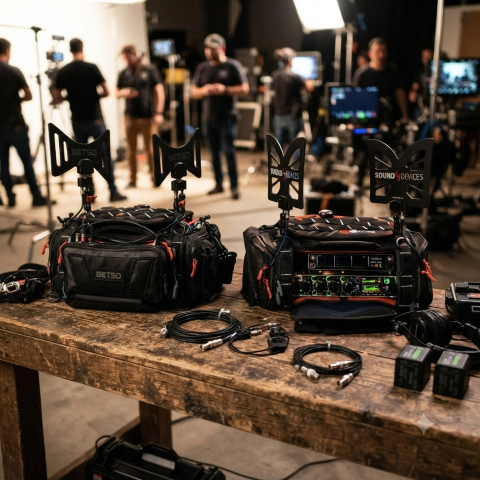
The Butterfly Effect: Comparing Wideband Antennas for Location Sound
Introduction
In the world of location sound, the antenna is your first line of defense. As the RF landscape becomes increasingly crowded—squeezed by spectrum auctions, 5G rollouts, and the constant hum of electronic noise—the choice of hardware mounted to your sound bag has never been more critical. The "butterfly" style omnidirectional antenna has become the industry standard for its portability, durability, and reliable performance. But with options ranging from the ultra-wideband A20-Monarch to the filter-integrated Betso BOWTIE, which one truly deserves a spot in your kit? In this post, we’ll compare the top contenders to help you decide how to keep your signal clean, strong, and interference-free on your next production.
At a Glance: Comparison Table
| Feature | Sound Devices A20-Monarch | Betso BOWTIE | Deity BF1 |
|---|---|---|---|
| Freq. Range | 470 – 1600 MHz | 470 – 700 MHz | 470 – 1000 MHz |
| Inbuilt Filter | None | Yes (700 MHz Low Pass) | None |
| Best For | Ultra-wideband needs (SpectraBand) | High-interference environments | Value & broad compatibility |
Key Differences
1. Frequency Range & Versatility
- Sound Devices A20-Monarch: The clear winner for frequency range. It is designed to cover the entire SpectraBand range (up to 1600 MHz), making it the most future-proof option if you are using wideband gear that operates outside the standard UHF TV band. (Everything Audio Europe)
- Deity BF1: Offers a very respectable 470 MHz – 1000 MHz range, which covers virtually all standard professional wireless microphone systems currently on the market. (B&H)
- Betso BOWTIE: Has the most limited range (470 – 700 MHz). It is specifically engineered for the traditional UHF spectrum. (BETSO)
2. Interference Mitigation
Betso BOWTIE: This is its "secret weapon." It features a built-in 700 MHz low-pass filter. In modern production environments where LTE/5G and other high-frequency signals often cause interference, this hardware filter helps clean up your signal before it even hits your receiver or multicoupler.
A20-Monarch & BF1: Neither of these include an integrated filter. If you operate in extremely congested RF environments, you may need to add an external band-pass filter to your signal chain when using these antennas.
3. Build & Mounting
Betso BOWTIE & Deity BF1: Both are rated IP65, meaning they are dust-tight and protected against water jets, making them excellent choices for outdoor field work in varying weather conditions.
Mounting: All three utilize standard 1/4"-20 threading, making them compatible with most sound bag mounting hardware. The A20-Monarch and BF1 kits are particularly well-regarded for the inclusion of versatile, high-quality articulating arms in the box.
Pro-Tip: The Importance of Cable Maintenance
While we often focus on the antenna's frequency range and gain, your signal is only as good as the cable connecting it to your receiver.

Pro-Tip: If you’re using high-quality antennas like these, don't pair them with cheap, high-loss coax. Use RG-174 or RG-316 cables with high-quality, properly crimped BNC connectors. More importantly, keep your cable runs as short as possible. Every foot of cable between your antenna and your distribution system introduces signal loss (attenuation). Even the best antenna in the world will underperform if it's struggling to push a signal through ten feet of poor-quality, poorly shielded cable. Aim to keep your cable runs under three feet for your sound bag setup, and always inspect your BNC connections for signs of strain or corrosion at the start of every production day.
Which one should you choose?
Choose the Sound Devices A20-Monarch if: You are invested in the Sound Devices Astral/SpectraBand ecosystem or require the absolute widest frequency coverage possible (up to 1.6 GHz).
Choose the Betso BOWTIE if: You work primarily in busy urban areas or near cellular towers. The integrated 700 MHz filter is a significant advantage for maintaining a clean noise floor in high-interference environments.
Choose the Deity BF1 if: You want the best balance of price, performance, and broad compatibility. It is an excellent "workhorse" antenna that handles the standard UHF range (and slightly above) with ease and comes in a complete, ready-to-use kit.
👉 Return to RR.COM 👈