
Inside Audio

Microphone

All posts tagged Microphone by Inside Audio
  • Posted on
    The Audio Bag Toolkit—Mastering Microphone Physics and Signal Literacy

    Module 3: The Mixer’s Toolkit — Hardware & Signal Literacy
    Before a mixer can master placement, they must understand their tools at a fundamental level. Moving from "how to use it" to understanding what is happening under the hood separates hobbyists from professionals.

    Anatomy of an Audio Bag
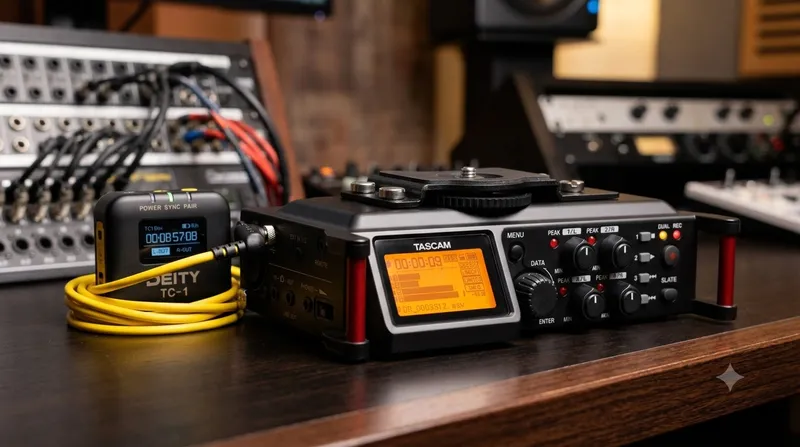
    The modern audio bag is more than just a carrier; it’s a mobile studio hub.

    • Recorders/Mixers: While brands like Sound Devices offer unparalleled preamps and reliability, Zoom offers incredible versatility for smaller budgets. Understanding the difference between your recorder's input stage and its processing capabilities is vital.
    • Wireless Receivers & Monitoring: High-quality headphones are perhaps a mixer’s most critical tool; if you cannot hear the subtle hiss or RF interference in real time, it will find its way into the final mix regardless of how good the gear is.
    • Power Management: Batteries are your best friend and worst enemy. A professional always tracks power consumption to ensure they never experience a "dead" take during an actor's emotional climax.

    Microphone Physics for Non-Engineers: Polar Patterns
    Understanding polar patterns allows you to manipulate what the microphone refuses to hear.

    • Cardioid: Rejects sound from the rear, making it ideal for isolating voices in noisy rooms.
    • Supercardioid/Hypercardioid: These have much tighter "lobes" of sensitivity at the front but are more sensitive immediately off-axis (to the sides). Knowing how to angle a hypercardioid mic so an actor's shoulder doesn't create a massive audio shadow is essential for clarity.

    The Digital Chain & Sample Rates
    In professional cinema, we almost exclusively record in 24-bit/48kHz.

    • Sample Rate (48kHz): This ensures the frequency response covers what humans can hear while maintaining synchronization with video frame rates.
    • Bit Depth (24-bit): Bit depth determines your "dynamic range." In simpler terms, it provides more headroom between the quietest whisper and a loud shout without introducing digital distortion or excessive floor noise during post-production processing.

    👉 Return to RR.COM 👈
  • Posted on
    Mastering the Pole: A Guide to Professional Location Audio

    Mastering the Pole: A Guide to Professional Location Audio

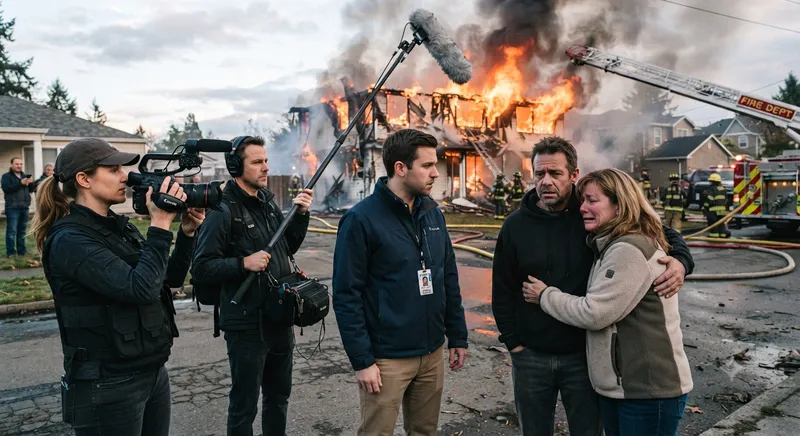
    In the world of location sound, the boom operator is the unsung hero. While the camera captures the visual story, your work ensures that the emotional core—the dialogue—is pristine. Achieving professional-grade audio requires more than just holding a pole; it requires a deep understanding of microphone placement, ergonomics, and, crucially, knowing when to put the pole down and use support gear.

    The Art of Handheld Booming The gold standard for dialogue remains the human-operated boom. A skilled operator can anticipate actor movement, manage cable noise, and pivot the microphone to capture off-axis cues seamlessly. When operating by hand:

    • Dynamic Scenes: Any scene involving blocking, walking, or sudden actor movement.
    • Close-ups/Intimate Dialogue: You need to react to subtle inflections and head turns.
    • Tight Spaces: Where stands would be physically impossible to place.

    When to Use Support Gear While handheld is preferred, there are scenarios where a boompole holder (cradle), C-stand, and sandbags are not just helpful—they are essential for consistency and safety.

    The Boompole Holder & C-Stand A professional setup usually involves a Boompole Holder (such as a K-Tek or Ambient cradle) mounted to a sturdy C-stand. Use this equipment in the following scenarios:

    • Static Interviews: When the subject is seated or standing in one position for an extended period, a stand ensures perfect, consistent mic placement.
    • Wide Shots with Minimal Movement: If actors are stationary and you need to keep the mic just out of frame for a long take, a stand removes the physical fatigue that leads to "mic drift."
    • Solo Operation: If you are a one-person crew, you simply cannot hold the boom while monitoring levels or operating your recorder. A stand allows you to "set and forget" the microphone position safely.

    The Golden Rule of Sandbags
    If a boompole is on a stand, it must be sandbagged; this remains non-negotiable in professional environments.

    • Weight Distribution: Always place your sandbag on the leg of the C-stand that is pointing in the direction of the boom's weight.
    • Safety First: A boompole protruding into a set is a hazard. If a crew member bumps the stand, a sandbag provides the difference between a minor nudge and heavy equipment crashing into performers or expensive camera gear.
    • High-Traffic Areas: If you are filming near doorways, active walkways, or outdoors where wind could affect the pole, double-bag your stands for extra security.

    Comparison Guide: Handheld vs. Support Gear

    Feature Handheld Boompole Holder + Stand
    Adaptability Extremely High Low
    Fatigue High None
    Consistency Operator dependent Excellent
    Ideal For Action, blocking, walk-and-talks Interviews, static scenes, solo operators

    Final Pro-Tips for the Field Mastering the balance between active operation and knowing when to utilize professional support gear is what separates a novice from a seasoned sound professional.

    • Cable Management: Even when on a stand, never let your XLR cable hang loose. Use velcro ties to secure it to the stand to prevent it from acting as a "sail" in the wind or becoming a trip hazard.
    • The Shadow Check: Always check the camera monitor for shadows; a perfectly placed microphone can ruin a take if its shadow falls across an actor’s face.
    • Always Carry Extra Sandbags: You can never have too much weight on your stand. If the wind picks up or the set gets crowded, having extra bags ready keeps production moving safely and securely.

    Keep your ears open, keep your gear secure, and stay focused on that dialogue!

    👉 Return to RR.COM 👈