Inside Audio

Rusty Rogers

Practical Audio Information

  • Posted on
    Why Your Production Needs a Professional Sound Person

    Beyond the "Record" Button: Why Your Production Needs a Professional Sound Person

    In the fast-paced world of film and video production, it is easy to view audio as a "set and forget" component. You press record, you frame your shot, and you hope for the best. However, as any seasoned producer will tell you, poor audio is the fastest way to ruin an otherwise beautiful visual project.

    Hiring a professional sound person isn't just about someone holding a boom pole—it’s about bringing in a specialist who treats sound as a critical, foundational element of your production’s quality. (Gigantic Studios, NYC)

    The Value of a Pro: More Than Just "Good Sound"

    A professional audio engineer brings a layer of technical assurance and creative foresight that elevates a project from amateur to professional grade:

    • Flawless Consistency: They ensure that dialogue levels, tone, and ambient noise floors remain consistent across every take, making the editor’s job significantly easier and the final product much more immersive.
    • Problem Solving in Real-Time: From unexpected wind noise to the hum of a distant refrigerator, a pro identifies potential issues before they become permanent problems in your recording.
    • Workflow Efficiency: They bring industry-standard gear that doesn't just record—it integrates. By managing the complexities of metadata and synchronization, they save your post-production team hours (or even days) of manual syncing and frustration.

    The Backbone of My Modern Workflow: Deity Timecode

    One of the most significant ways a professional sound person streamlines your production is through the use of high-end timecode synchronization. When I am on set, my toolkit relies on the Deity SL-1 Smart Slate and Deity TC-1 Timecode Boxes.

    These tools aren't just accessories; they are the heartbeat of a synced production.

    Deity SL-1 Smart Slate: The Professional’s Reference The SL-1 is a game-changer for any production. It’s not just a clapperboard; it’s a high-precision timecode generator. With its anti-glare, dry-erase surface and a bright, dimmable LED dot-matrix display, it provides a frame-accurate reference that editors can see instantly. Because it supports all SMPTE timecode formats and communicates wirelessly via Bluetooth and 2.4 GHz, it ensures that your audio and video are locked together from the moment the clapper closes. (No Film School)

    Deity TC-1 Timecode Boxes: Seamless Connectivity The magic truly happens with the Deity TC-1. These compact powerhouses bring "Hollywood-level" sync to productions of any scale:

    • Universal Compatibility: Whether you are using a top-tier cinema camera, a professional audio recorder, or a compact mirrorless setup, the TC-1 fits right in. It connects effortlessly to mixers, recorders, and cameras via its locking 3.5mm TRS or other professional adapters, ensuring a secure, reliable connection that won't get knocked loose mid-take. (No Film School)
    • Wireless Freedom: With the Sidus Audio app, I can control up to 20 devices from up to 250 feet away. I can jam-sync every camera and audio source on set wirelessly, ensuring everyone is on the same clock. (Lens Rental)
    • Drift-Free Precision: The TC-1 features a highly accurate TXCO (Temperature Compensated Crystal Oscillator), providing less than one frame of drift over a 72-hour period. You can trust that your sync will be as tight at the end of a long day as it was at the very first take. (Deity Microphones)

    The Bottom Line

    When you hire a sound professional, you aren't just paying for labor—you're investing in peace of mind. By leveraging advanced tools like the Deity SL-1 and TC-1 ecosystem, your sound team ensures that your technical infrastructure is invisible, letting your creative vision take center stage.

    Don't let sync issues or poor audio quality be the thing that holds your next project back. Bring in a professional who understands that great film starts with great sound.

    Are you currently planning any upcoming shoots where we could integrate this timecode workflow to streamline your post-production? Contact me here. 👉 Return to RR.COM 👈

  • Posted on
    The Unsung Hero of the Gear Bag

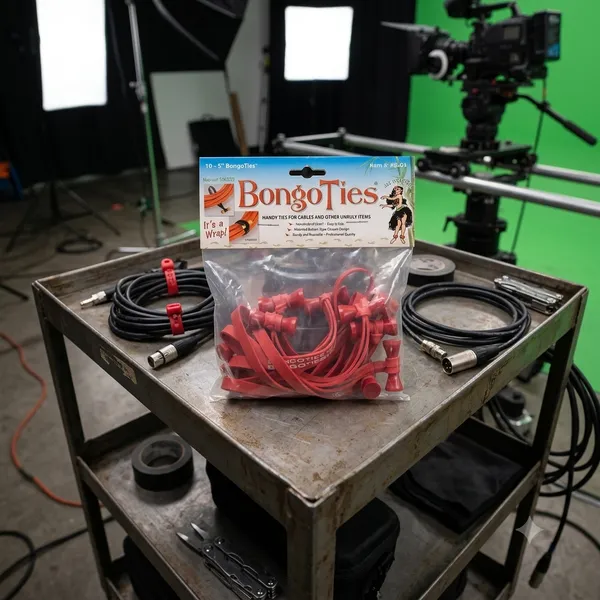
    The Unsung Hero of the Gear Bag: Why You Need Bongo Ties

    If you work in film, photography, music, or IT, you already know the nightmare: a tangled bird's nest of extension cords, HDMI leads, and audio cables sitting at the bottom of your bag.

    While the world tries to sell us complex plastic clips and disposable zip ties, the film industry's best kept secret is beautifully simple, incredibly cheap and practically indestructible.

    Meet the Bongo Tie

    Brilliant design in its simplest form.

    Invented by a pro photographer who was tired of wrestling with sticky tape and flimsy hook and loop straps, a bongo tie consists of just two elements

    1. A heavy duty, highly durable, Hevea rubber band.

    2. A patented flared bamboo pin that acts as a toggle.

    There are no gears, no hooks, no plastic to snap in cold weather. You just wrap the rubber band around your cables, loop it over the bamboo flared ends, and it snaps, locked under its own tension.

    4 reasons, they beat everything else.

    • No sticky residue: Unlike gaffer tape or electrical tape, they leave zero residue on expensive cables.
    • True one-handed operation: You can easily lock or release them with one hand while holding a heavy coil of wire with the other.
    • Reusable for years: Zip ties are a single use plastic waste nightmare. Bongo ties can be used hundreds of times before the rubber finally loses its snap.
    • The flared pin advantage: because the bamboo toggle is flared on both ends, the loop can't accidentally slide off, even under heavy vibration.

    Beyond Cables: Through Creative Uses

    While they were built for cords, anyone who owns a pack quickly discovers they are the ultimate "fix-it" tool. Production crews use them to strap wireless receivers to camera rigs, musicians use them to secure loose mic stands, and campers use them to lash gear to backpacks.

    In a world full of over-engineered gadgets, the Bongo Tie is a refreshing reminder that sometimes, the simplest solution is the best one.

  • Posted on
    The Set Essential: Joe’s Sticky Stuff

    The Set Essential: When and Where to Reach for Joe’s Sticky Stuff

    If you’ve ever spent time on a film set, you’ve probably heard someone yell for "snot tape." More often than not, they’re looking for a roll of Joe’s Sticky Stuff.

    Invented by Hollywood prop master Joe Connolly, this aggressive, clear, double-sided pressure-sensitive adhesive has become an absolute industry standard. But because it grips like crazy yet peels away cleanly, knowing exactly when and where to deploy it can save your track, your set, or your sanity.

    When to Use It: The Ideal Scenarios Joe's Sticky Stuff is a problem-solver for temporary but heavy-duty mounting. You should reach for it when:

    • Residue is a Dealbreaker: Unlike standard carpet tape or heavy-duty gaffer tape, it leaves zero gummy residue and won't mar delicate finishes or strip the paint off a location's walls.
    • You Need Vibration Dampening: Because it’s a pliable, rubber-like butyl material, it absorbs micro-vibrations—making it a secret weapon for audio capture.
    • An Object Needs to Look "Un-Taped": Since it’s double-sided and hides completely beneath an object, it’s perfect for anything that will be seen on camera or on display.

    Where It Shines: Department by Department While the art department might run through the most rolls, this stuff is universally loved across the entire crew.

    1. In the Sound Department: Taming Lavaliers Hiding a lav mic under stiff clothing or on a tricky chest piece? A tiny piece of Joe's Sticky Stuff can lock down a capsule, stick a mic mount directly to skin or fabric, and instantly kill clothing rustle by immobilizing the fabric layers.

    2. In the Prop & Set Dec Departments: Locking It Down Whether it's keeping a picture frame perfectly level on a wall, securing a rogue rug from sliding during a high-energy stunt, or keeping props perfectly static on a shelf between takes, this tape keeps everything exactly where the continuity log says it should be.

    3. On the Camera Rig: Quick Tools Need your dry-erase markers right next to the slate? Want to temporarily mount a small wireless receiver or a reference card to a monitor cage? A little piece of Sticky Stuff gives you an instant mounting point without adding bulk.

    4. Off-Set & Around the House The utility doesn’t stop when production wraps. It's the ultimate tool for running desk cables cleanly along a wall, anchoring drawer organizers so they don't slide around, or hanging temporary seasonal decorations without putting holes in the drywall.

    Pro Tip for Clean Removal: Don't just yank the object straight off. Give it a gentle twist to break the initial seal, then slowly stretch and peel the tape away from one end. It will lift off in one clean piece.


    How does Joe's Sticky Stuff perform in extreme weather conditions like high heat or freezing cold, and how should you handle it?

    Like most pressure-sensitive adhesives, Joe’s Sticky Stuff is highly responsive to the environment. Because it is a pliable butyl-based gel, temperature shifts alter its physical properties—making it behave very differently on a freezing exterior night shoot versus a scorching blacktop in mid-July.

    Here is how it performs under extreme conditions and exactly how to handle it.

    🥶 In Freezing Cold: The "Glass" Effect When the temperature drops (especially below 40°F / 4°C), the liquid components within the adhesive begin to harden.

    • The Performance: The tape loses its "wetting ability" (its power to flow into the microscopic pores of a surface). It becomes stiff, dry, and brittle. If you try to apply it cold, it simply won't grab, or it will pop right off under the slightest weight.

    • The Fix: *Warm the tape: Keep the roll or tin of Sticky Stuff inside your inner jacket pocket close to your body heat until the moment you need it ***Prep the surface**: If you are sticking it to a cold piece of metal or plastic, quickly warm the area with a pocket heater, hair dryer, or even your hands before applying the tape. Once it bonds at a warm temperature, it handles the cold much better.

    🥵 In High Heat: The "Meltdown" Effect On the flip side, extreme heat (above 90°F / 32°C) softens the tape's internal structure.

    • *The Performance: The adhesive shifts from being firm and elastic to overly soft and gooey. While its initial tack (stickiness) will actually increase, its cohesive strength drops. Under heavy loads or vertical stress (like a heavy prop hanging on a wall in a hot warehouse), the tape can stretch out like warm taffy, causing the object to sag or fall. (Lamtek)

    • The Fix: *Keep it cool: Store your rolls in a shady spot, an air-conditioned production vehicle, or a cool gear case—never leave the tin sitting face-up on a hot gear cart in direct sunlight. Increase surface area: If you must use it in hot conditions, use a slightly larger piece than normal to distribute the weight and prevent the softened gel from shearing or slipping.

    🌡️ The Golden Rule for Storage and Application

    Acclimatize Before You Apply: For the absolute strongest bond, always apply Joe's Sticky Stuff at a comfortable room temperature (60°F to 85°F). Once the tape has had a few minutes to fully "wet out" and bond to a clean surface, it can successfully withstand significant temperature drops or shifts afterward.

    How do you clean up or remove residue from butyl adhesives like Joe's Sticky Stuff if they melt or smear?

    Because butyl is a synthetic rubber and not a traditional water-based glue, reaching for standard soap and water will only smear it around. You need a specific approach to break it down without damaging the surface underneath.

    The Best Methods for Cleanup

    1. The "Fight Fire with Fire" Method (Mechanical Removal) Before applying any liquids, use the adhesive's own cohesive nature to lift the residue.

    • Take a fresh, clean piece of Joe's Sticky Stuff (keep it cool so it’s firm).
    • Press it firmly directly onto the smeared residue, then yank it away quickly.
    • The residue will often prefer to stick to the fresh piece of tape rather than the surface, pulling it up cleanly without chemicals.

    2. Citrus-Based Cleaners (Best Overall) If the smear is too flat or thin to lift mechanically, a citrus-based adhesive remover is your absolute best option.

    • Products: Goo Gone or commercial-grade D-Limonene cleaners.
    • How it works: The natural oils in citrus break down the butyl polymer chains, turning the sticky gel into a non-tacky liquid.
    • Process: Apply a small amount to a clean microfiber cloth, let it sit on the smear for 60 seconds, and wipe it away. Wipe the area with a damp cloth afterward to remove the oily cleaner.

    3. Isopropyl Alcohol (Safe for Electronics and Sound Gear) If you are cleaning a lav mic capsule, wireless transmitter, or sensitive camera rig, avoid oily citrus cleaners.

    • Use 91% or 99% Isopropyl Alcohol (IPA).
    • Apply it to a cotton swab or microfiber cloth. It won't dissolve the butyl as quickly as citrus, but it will rapidly dry out the tackiness, allowing you to roll the residue off into small balls with your finger or a cloth.

    🚫 What to Avoid

    • WD-40: While it will dissolve butyl rubber, it leaves behind a heavy petroleum film that is incredibly difficult to completely clean off, which might ruin the surface for future tape applications.
    • Acetone or Nail Polish Remover: Do not use this on plastics, painted surfaces, or gear chassis. Acetone will easily melt plastic housing, strip paint, and ruin delicate finishes.
    • Tissues or Paper Towels: Never rub a wet smear with cheap paper towels or tissues. The loose fibers will instantly bond to the butyl, creating a fuzzy, cemented mess that is twice as hard to clean. Stick to microfiber cloths or specialized non-woven wipes.
    • ALWAYS TEST ANY SOLVENTS OR CHEMICALS IN AN INCONSPICUOUS LOCATION!

    Sound & Camera Crew Tip: If you're working with delicate lavalier mic cables or clothing fabrics, always test a tiny drop of your cleaner on an inconspicuous spot first to ensure it won't discolor the material or degrade the rubber coating of the wire.

    Life is better when we all stick together!

  • Posted on
    Is the Zoom F8n Pro Still the Value Heavyweight?

    Virtues, Vices, and 32-Bit Float: Is the Zoom F8n Pro Still the Value Heavyweight?

    Introduction

    For years, the location sound industry was divided into two distinct tiers: ultra-affordable, prosumer handy recorders and multi-thousand-dollar elite field mixers. When Zoom launched the F-series, they intentionally broke that barrier. The Zoom F8n Pro represents the peak of this evolution.

    By marrying high-channel capacity with dual A/D converters and 32-bit float recording, the F8n Pro promises bulletproof audio that cannot clip. But is it a true replacement for a high-end production bag, or are there hidden workflow compromises? Let’s break down the virtues and drawbacks of this field recording powerhouse. (B&H)

    The Virtues (The Pros)

    1. 32-Bit Float: Bulletproof Dynamic Range The headline feature of the "Pro" moniker is the dual analog-to-digital (A/D) converters paired with 32-bit float recording.

    • What it means: You essentially no longer have to set input gain to prevent digital clipping.
    • The Reality: If a scene transitions from a quiet whisper to a sudden explosion, the F8n Pro captures the entire waveform without distortion. Even if the file looks clipped in your DAW, pulling down the gain slider recovers the audio perfectly. For solo shooters or fast-moving indie sets, this is an absolute lifesaver. (Sweetwater)

    2. Form Factor and Build Quality

    Unlike the smaller MixPre series, which often places crucial knobs on the side, the F8n Pro is built strictly for a sound bag configuration.

    • All 8 locking Neutrik XLR/TRS combo jacks are cleanly split on the sides (Channels 1–4 on the left, 5–8 on the right).
    • The front panel remains clear for channel knobs, LED meters, and the crisp, highly visible color display.
    • The aluminum chassis feels rugged enough to take "into battle" on demanding field shoots.

    3. Comprehensive Timecode

    Timecode is the barrier to entry for professional film sets, and Zoom nailed it here. The F8n Pro utilizes a temperature-compensated crystal oscillator (TCXO) that generates timecode accurate to 0.2 ppm. Crucially, it holds its clock for up to two hours after being powered down—meaning you can swap batteries at lunch without losing sync with your cameras. (Wav.Report)

    4. Advanced Software Tools: AutoMix and Ambisonics

    The inclusion of an AutoMix algorithm automatically adjusts the gain of active vs. inactive microphones. This is a massive time-saver for multi-person podcasts or panel discussions, significantly reducing background spill and room tone phase issues in real time. For VR and spatial audio designers, it also handles internal Ambisonic decoding seamlessly. (AudioTechnology)

    The Drawbacks (The Cons)

    1. Ergonomics: Tiny Knobs for Big Hands While the layout is structurally great for a bag, the physical control knobs are undeniably minuscule.

    • Adjusting individual channel levels or riding faders on a fast-paced set can feel incredibly fiddly, especially if you are wearing gloves.
    • The Fix: To get true physical mixing capabilities, you almost have to buy the external Zoom F-Control (FRC-8) mixing desk, adding bulk and cost to your setup.

    2. Comms, Routing, and Output Ecosystem This is where the line between "indie tool" and "Hollywood standard" becomes clear.

    • Outputs: The F8n Pro uses a mix of TA3 connectors for its main outputs and a single 3.5mm jack for its sub-outputs. For complex sets requiring multiple distinct monitoring feeds (e.g., separate mixes for the Director, Script Supervisor, and Boom Operator), the routing matrix can quickly become limiting.

    • Comms: Setting up internal communication or a dedicated talkback/private line loop to your boom op through the F8n Pro requires complex workarounds compared to higher-end sound mixers.

    3. The Digital Signal Path Catch-22 Because the unit relies on digital processing for its high-pass filters and limiters, your analog microphone signal is converted to digital before these filters are applied. While the 32-bit float system mitigates clipping issues, purists note that you lack the warm, analog limiter stage found in premium competitors. (Reddit)

    4. Bizarre Input Layout A minor but persistent annoyance for veteran audio engineers is Zoom’s layout sequence. When looking at the left panel, the inputs read from right to left rather than left to right. It breaks decades of muscle memory and can lead to minor confusion when patching cables in a dark bag.

    Power Infrastructure and Rigging: The Three-Way Lifeline In location sound, power failure is the ultimate sin. Zoom engineered the F8n Pro with an exceptionally flexible power infrastructure, borrowing a page directly from high-end sound carts. It utilizes a tri-tier power management system that allows seamless fallovers.

    enter image description here

    1. The Pro Standard: Hirose 4-Pin DC Input For serious bag setups, the inclusion of a dedicated HIROSE HR10A-7R-4S 4-pin connector is a major selling point. (ZOOM)

    • The Specs: It accepts a wide input voltage range of 9V to 18V DC.
    • The Workflow: This allows you to integrate the F8n Pro directly into a professional distribution system (like an eSMART, Remote Audio BDS, or an NP-1/smart battery system).
    • The Smart Failover: The recorder features an internal, software-controlled voltage threshold setup. If your external smart battery runs dry, the F8n Pro automatically and silently drops back onto its internal power array without dropping a single sample of audio.

    2 The Internal Array: 8x AA Batteries When you don't want to rig up an external power distribution system, or if you need an absolute fail-safe backup, the bottom of the chassis features a slide-out sled accommodating 8 AA batteries.

    • Crucial Tip: You must manually select your battery chemistry in the system menu (Alkaline, NiMH, or Lithium) so the unit can accurately calculate the remaining voltage curve and warn you before shutting down.

    3. AC Power For desktop use, podcast studios, or cart setups near mains power, it ships with the Zoom AD-19 (12V DC, 2A) barrel plug adapter.

    Real-World Power Draw & Battery Life Benchmarks The F8n Pro has a maximum total power consumption rating of 15W. However, its actual battery performance scales drastically depending on how hard you push the digital signal processing, how many preamps are active, and whether you are forcing the unit to supply 48V phantom power. (Markertek)

    Here is what you can realistically expect from a fresh set of 8 AA batteries:

    Setup / Rigging Scenario Alkaline AAs NiMH AAs (2500 mAh) Lithium AAs
    Light Load ~6 to 7 hours ~8 to 8.5 hours ~12 to 13.5 hours
    (2 Channels, 48kHz, Phantom OFF, Timecode OFF, Screen Low)
    Standard Film Set Load ~4.5 to 5 hours ~6 to 7 hours ~9.5 to 10 hours
    (8 Channels, 48kHz, Phantom OFF, Screen Medium)
    Maximized Field Load ~30 mins ~1 to 1.5 hours ~2 to 2.5 hours|~9.5 to 10 hours
    (8 Channels, 144kHz/192kHz, All Phantom 48V ON, Timecode Free Run, Screen Bright)

    ⚠️ Pro-Tip for the Field Running 8 channels with continuous 48V phantom power at 192kHz sample rates will chew through standard Alkaline AA batteries in roughly 30 minutes. If you are tracking a heavy musical ensemble or a complex ambient soundscape in high resolution, avoid AAs entirely and run a high-capacity LiFePO4 or Lithium-ion pack via the Hirose input. A standard 48Wh external battery pack can easily push the F8n Pro past 12 to 14 hours of continuous multi-channel runtime.

    Feature Comparison Table

    Feature Zoom F8n Pro Standard Pro Competition (e.g., Sound Devices 8-Series)
    Price Point ~$700 - $1,000 $4,000+
    Resolution Up to 32-bit Float / 192 kHz Up to 32-bit Float / 192 kHz
    Preamps Clean, low-noise (+75dB max gain) Ultra-premium, discrete analog topologies
    Routing Flexibility Moderate (Main TA3 + Sub 3.5mm) Complex (Multiple independent buses/XLR/TA3)
    Comms / Talkback Limited / Basic Slate Mic Limited / Basic Slate Mic

    App Control & Metadata: Solving the Ergonomic Problem?

    While the F8n Pro’s miniature physical knobs can be a bottleneck on set, Zoom offers a remarkably seamless software solution to bypass them entirely: the F8 Control App (available for iOS and Android). (Google Play) By connecting to the recorder via built-in Bluetooth LE, your smartphone or tablet essentially transforms into a high-resolution, large-scale wireless monitoring control surface.

    1. Remote Mixing and Level Monitoring Instead of fumbling with the tiny dial layout on the front panel, the app gives you a highly responsive, multi-touch mixer screen. You can effortlessly adjust trim levels, pan settings, and track faders on the fly. (Apple App Store)

    • The Workflow Advantage: This means you can keep the F8n Pro securely zipped up inside a protective weather-proof sound bag while managing your entire mix comfortably from a phone clipped to your harness or a tablet mounted on a stand.

    2. High-Speed iXML Metadata Entry Entering metadata via a push-and-turn encoder knob on a tiny recorder screen is a notorious form of cognitive torture on set. The F8 Control App fixes this by unlocking your mobile device's native touch keyboard.

    • You can instantly type out complex scene numbers, track names, notes, and circle takes into the broadcast-standard iXML metadata architecture.

    • Having clean, accurately labeled audio files that mirror the camera’s slate format saves your editor hours of tracking in post-production. The app also lets you sync the recorder’s internal date and time clock directly to your device with a single tap.

    Conclusion: The Final Verdict

    The Zoom F8n Pro is an undisputed value champion. If you are an indie filmmaker, documentarian, corporate video producer, or immersive sound designer, this machine offers roughly 90% of the field performance of an elite-tier recorder at a fraction of the cost. The dual-converter 32-bit float safety net alone makes it a bulletproof investment for fast-moving crews.

    However, if your daily workload consists of high-track-count narrative television, complex commercial sets requiring heavy real-time comms routing, or extensive camera hops, the hardware’s physical scaling limits will eventually push you toward a premium upgrade. But until you reach that high-budget threshold, the F8n Pro remains the ultimate power-to-price heavy lifter in location audio.

    For a visual walkthrough on utilizing these tools in a production environment, you can check out this guide on Working On a Film or Theatre Set with the Zoom F8n Pro Control App, which demonstrates how utilizing a tablet interface speeds up workflow when the hardware is tucked away inside an audio bag.

  • Posted on
    Pro Audio on an Indie Budget

    Pro Audio on an Indie Budget: How to Rig the Tascam DR-70D and Deity TC-1 for Perfect DSLR Sync

    We’ve all been there. You’re shooting on a crisp mirrorless or DSLR camera, the image looks beautiful, but your audio workflow is a total mess. You want the pristine quality of external XLR microphones, but manually lining up clapperboards or relying on “sync by waveform” features in post-production can slow your editing workflow to a crawl.

    If you don’t have thousands to drop on a high-end cinema camera with built-in timecode metadata inputs, don't worry. By combining two affordable workhorses—the Tascam DR-70D and the Deity TC-1—you can build a professional, frame-accurate timecode and multi-channel audio ecosystem for a fraction of the cost.

    Here is how to set up this ultimate budget-friendly filmmaking rig.

    Why This Combo is a Game Changer

    The Audio Muscle: Tascam DR-70D The Tascam DR-70D is a legendary, form-fitting 4-channel field recorder designed specifically to bolt right underneath or on top of your DSLR. (Tascam)

    • Four XLR/TRS Combo Jacks: True professional connectivity for shotgun mics and lavaliers.
    • Great Preamps: HDDA (High Definition Discrete Architecture) preamps give you clean gain with low hiss.
    • Form Factor: It acts as a bridge between your camera and your tripod, keeping your rig tight and portable.

    The Sync Master: Deity TC-1 The Deity TC-1 is a tiny, incredibly smart wireless timecode generator.

    • Audio Timecode (LTC): Because DSLRs and the DR-70D don’t have dedicated BNC timecode ports, the TC-1 converts timecode into an audio signal (Linear Timecode).

    • Zero Drift: It boasts an accuracy that ensures less than 1 frame of drift over a 72-hour period. (Deity Microphones)

    • Sidus Audio App: You can control, sync, and monitor multiple TC-1 boxes right from your phone via Bluetooth. (Newsshooter)

    Step-by-Step Setup Guide

    Because we are working with consumer/prosumer gear, we will be recording Audio Timecode (LTC). This means the timecode will sound like a digital screech on one of your audio tracks, which your editing software will seamlessly translate into perfect visual timestamps later.

    Step 1: Set Up Your Frame Rates Before turning anything on, make sure your camera, your Tascam recorder, and your Deity TC-1 are all set to the exact same frame rate (e.g., 23.976 fps, 24 fps, or 29.97 fps).

    Step 2: Configure the Deity TC-1

    1. Turn on the** TC-1 and open the Sidus Audio App on your phone to sync the time of day.

    2. In the TC-1 menu, navigate to OUT TYPE and select A-OUT (Audio Out / Mic Level). This ensures the signal isn’t too hot for the Tascam's mic inputs.

    3. In the TC-1 menu, navigate to OUT TYPE and select A-OUT (Audio Out / Mic Level). This ensures the signal isn’t too hot for the Tascam's mic inputs.

    Step 3: Connect to the Tascam DR-70D

    1. Mount the DR-70D to your camera and pop the Deity TC-1 into the camera's hot shoe (or hook-and-loop it to the side of the Tascam).

    2. Using the included 3.5mm locking TRS cable, plug the TC-1 into the EXT IN 1/2 jack (or use a 3.5mm-to-XLR adapter into Input 1) on the Tascam DR-70D.

    3. On the Tascam, set that specific channel’s input level to MIC (make sure phantom power is turned off for that channel).

    Step 4: Plug in Your Production Mics

    Plug your actual boom or wireless lavalier microphones into the remaining XLR channels (e.g., Channels 2, 3, or 4). Adjust your gains normally. Channel 1 will strictly be dedicated to recording that digital timecode screech.

    Pro Tip: If you want timecode on your camera's internal scratch audio as well, you can run a 3.5mm splitter from the TC-1, or buy a second affordable TC-1 box to plug directly into your camera’s 3.5mm microphone input.

    Pro Tip: In the Monitor section on the Tascam, disable the channel that is recording Timecode.

    How to Sync It in Post-Production When you wrap your shoot and dump your footage, you’ll have video files from your DSLR and separate multi-track audio files from your Tascam.

    1. Import your footage and audio into your NLE of choice (DaVinci Resolve, Premiere Pro, or Final Cut Pro).

    2. Select your files, right-click, and look for "Read Timecode from Audio Track" or "Update Timecode from Audio LTC."

    3. On the Tascam, set that specific channel’s input level to MIC (make sure phantom power is turned off for that channel).

    4. Click "Sync Clips," and like magic, your external Tascam multi-track audio will perfectly snap into alignment with your DSLR video files.

    The Verdict

    You don’t need an expensive RED, ARRI, or Sony FX6 to experience the speed and efficiency of a professional timecode workflow. For a couple hundred bucks, adding a Deity TC-1 to a Tascam DR-70D completely bridges the gap between indie DSLR shooting and high-end Hollywood workflows. You get the pristine, multi-channel audio control of a dedicated field recorder, combined with the one-click syncing luxury of expensive cinema packages.

    What does your current audio setup look like, and how much time are you spending syncing clips manually in post?

  • Posted on
    Maximizing the Zaxcom Nova 2

    Inside the Bag: Maximizing the Zaxcom Nova 2 and the VTX Board Upgrade

    For professional sound mixers, the relentless pursuit of reducing bag weight while expanding track counts and functionality is a balancing act. When Zaxcom dropped the original Nova, it redefined the "all-in-one" workflow by jamming a mixer, recorder, ZaxNet hub, and dual wireless receiver slots into a 3.5-pound footprint.

    The Zaxcom Nova 2 refines this formula, bringing expanded AES I/O (up to 16 digital inputs), robust processing, and those highly addictive infinity encoders. But for mixers looking to fully streamline their setup, the real conversation centers around the optional VTX internal transmitter board. (Trew Audio)

    Let’s dive into what makes the Nova 2 a production powerhouse, and whether checking the box for the optional VTX board is right for your workflow.

    The Nova 2 Foundation: What We Love Before looking at the VTX expansion, it's worth noting why the Nova 2 remains a top-tier centerpiece for bag mixers:

    • NeverClip™ Preamps: Boasting 140 dB of dynamic range on its four primary XLR inputs, it handles unexpected shouting or transient explosions flawlessly without needing brick-wall limiters. (Gotham Sound)

    • The Unmatched Slot-In Advantage: Dual slots accommodate MRX414 modules, allowing you to pull in up to 8 channels of digital wireless internally. No external audio loops, no power distribution nests, and significantly less RF loss. (Dale Pro Audio)

    • MARF II Recording: Zaxcom’s proprietary Mobile Audio Recording Format writes directly and instantly to the primary CF card. If your battery drops mid-take, your file isn't corrupted. (Trew Audio)

    Enter the VTX Board: The Ultimate Bag Consolidation? The Nova 2 is sold in two primary configurations: standard (relying on its built-in 2.4 GHz ZaxNet transmitter) and the Nova 2-V, which includes the integrated VTX VHF transmitter module.

    The VTX board is explicitly designed to transmit high-quality analog/digital IFB audio and timecode to client monitoring systems—specifically tailored to work alongside Zaxcom's VRX1 VHF receivers, as well as legacy VHF systems.

    ZAXCOM NOVA 2
    Dual Receiver Slots Optional VTX Board
    (Up to 8 ch Wireless) (Internal VHF IFB/TC Transmit)

    The Virtues: Why Mixers Love the VTX Board

    1. Zero-Footprint IFB Transmission Without the VTX board, if you want a high-power VHF feed for clients or script supervisors (like running a Comtek or external transmitter), you have to mount an external TX to your bag, wire up an audio output, and run a separate power tap. The VTX board lives completely inside the chassis, powered internally, utilizing a dedicated SMA port on the box.

    2. Radical Power and Space Savings By eliminating an external transmitter, you shave precious ounces off your bag and clean up your cabling. Furthermore, because it’s engineered directly into the Nova 2's power rail, the power consumption is incredibly efficient compared to firing up a completely separate third-party transmitter.

    3. Deep ZaxNet Integration The VTX board seamlessly coexists with ZaxNet functionality. You get a centralized hub where scanning for clean frequencies automatically places your talent transmitters into non-transmitting mode, evaluates the local spectrum, and maps out clean channels instantly. (Gotham Sound)

    The Drawbacks: Points to Consider While the VTX board sounds like a no-brainer, there are real-world trade-offs that sound mixers should weigh carefully.

    1. Ecosystem Lock-In To get the absolute most out of the VTX board’s specialized capabilities, you really want to be pairing it with Zaxcom's dedicated VHF equipment (like the VRX1). While mixers report great results jumping onto legacy analog VHF channels (like Comtek frequencies), your mileage may vary if your local client base or rental houses are firmly married to a different monitoring ecosystem.

    2. Concentration of Assets (The Single Point of Failure) When your mixer, recorder, receivers, ZaxNet hub, and IFB transmitter are all inside one single chassis, your entire sound department lives in one basket. If the unit ever needs to go back to the factory for service or a hardware repair, you aren't just losing your recorder—you are losing your entire wireless and client-monitoring infrastructure.

    3. Field Serviceability vs. Factory Upgrades The Nova 2 is vastly improved in terms of field serviceability (the memory card interface and standard IFB antennas are modular). However, if you buy the base Nova 2 model and decide you want the VTX board down the line, it requires sending the machine back for a factory upgrade, rather than being a simple user-swappable drop-in slot. (Trew Audio)

    The Verdict If you are a location sound mixer who thrives on a lightweight "run-and-gun" reality bag, a commercial setup, or fast-moving indie features, the Nova 2 with the VTX board is arguably the neatest audio package available. It completely removes the "bag acne" of Velcroed transmitters and cable nests.

    However, if your workflow requires throwing an IFB transmitter high up on a master antenna mast away from your body, or if you regularly interface with crews providing their own non-VHF monitoring setups, sticking with the base Nova 2 and utilizing external AES/analog routing might give you the modular flexibility you need.

    Are you considering updating your current bag architecture to an all-in-one system, or are you looking to integrate the Nova 2 into an existing cart-based workflow?

  • Posted on
    Deity PR-4 vs. Sound Devices MixPre-3 II

    Battle of the Ultralights: Deity PR-4 vs. Sound Devices MixPre-3 II

    For years, if you wanted professional, "never-clip" 32-bit float audio in a compact package, the industry answer was automatic: get a Sound Devices MixPre-3 II. It’s been the gold standard for run-and-gun filmmakers, podcasters, and sound designers alike.

    But Deity has shaken things up with the PR-4, a six-track field recorder specifically built to challenge that undisputed crown

    If you’re trying to decide between the classic titan and the new challenger, the choice actually comes down to your physical rigging and your wireless workflow. Here is how they stack up.

    The Quick Verdict: Which Should You Buy?


    Choose the Deity PR-4 if: You run a solo or small-crew video rig, use wireless lavaliers alongside a boom, rely on app-based control, and want an all-in-one wireless timecode ecosystem without buying extra hardware boxes.

    Choose the Sound Devices MixPre-3 II if: You require the absolute lowest noise floor for whisper-quiet environments (like nature recording), want full-sized physical gain knobs, and need three dedicated XLR inputs rather than combo/3.5mm compromises.


    The Tail of the Tape: Spec Comparison

    Feature Deity PR-4 Sound Devices MixPre-3 II
    Max Tracks 6 tracks (4 ISOs + Stereo Mix) 5 tracks (3 ISOs + Stereo Mix)
    Physical Inputs 2x XLR/TRS Combo, 1x Stereo 3.5mm 3x XLR
    Preamps / Gain ReGain Preamps (+60 dB) Kashmir Preamps (+76 dB)
    Max Resolution 32-bit Float / 192 kHz 32-bit Float / 192 kHz
    Storage Backup Dual: SD Card + Internal 64GB SSD Single: SD Card only
    Remote Control Sidus Audio App (Bluetooth) Wingman App (Bluetooth)
    Timecode Wired I/O + Native Wireless Sync Wired I/O (BNC / Aux In)
    Power Options Sony NP-F550, USB-C PD, 4-pin Hirose AA sled, Sony L-Mount sled, USB-C
    Price ~$449 ~$895

    3 Critical Differences You Need to Know

    1. The Inputs: 3 XLRs vs. "The Hybrid 4" The MixPre-3 II features three pristine, full-sized XLR inputs powered by legendary Kashmir preamps. They offer an incredible +76 dB of gain, making them capable of driving notoriously "gain-hungry" dynamic mics (like the Shure SM7B) completely clean.

    The Deity PR-4 offers four inputs, but they are split up: two XLR/TRS combo jacks and a stereo 3.5mm jack for channels 3 and 4 (B&H)

    • Why this matters: If you're hosting a 3-person podcast with XLR mics, the MixPre wins. But if you’re a videographer running a boom mic on XLR and a dual-channel wireless receiver (like a DJI Mic 2 or Rode Wireless PRO) via 3.5mm, the PR-4 gives you four clean tracks without needing messy adapters. (CVP)

    2. Timecode & The Wireless Ecosystem Both recorders handle standard wired timecode perfectly. However, the Deity PR-4 pulls ahead for solo shooters by acting as a wireless timecode master hub. Out of the box, it can natively sync timecode over the air to Deity's TC-1 boxes or TC-SL1 smart slates. If your cameras are outfitted with Deity gear, syncing your entire set takes seconds from the Sidus Audio phone app. To get wireless timecode on the MixPre, you have to buy a third-party add-on like a Timecode Systems Bluetooth module. (Sound on Sound)

    3. Redundancy: The "Forgot My SD Card" Lifesaver If you’ve ever formatted a card on set by accident, this feature will resonate with you. The MixPre-3 II records strictly to a single SD card. The Deity PR-4 introduces dual-media recording: it writes your tracks to an SD card and a built-in 64GB internal SSD simultaneously. If your card fails, or if you simply leave it sitting in your computer's card reader at home, the PR-4 still saves your shoot. (Deity Microphones)

    The Usability Factor The MixPre-3 II features beautiful, tactile physical knobs on the front for dialing in your headphone levels or mixes on the fly. The PR-4 relies heavily on its AMOLED touchscreen interface and smartphone app. If you hate digging through digital menus in the field, the MixPre's analog layout remains unmatched.

    Summary The Sound Devices MixPre-3 II remains an absolute boutique audio powerhouse with unmatched preamps, stellar build quality, and a premium price tag to match.

    However, at roughly half the price, the Deity PR-4 isn't trying to beat Sound Devices at the acoustic engineering game—it's trying to out-smart it. By packaging an internal SSD backup, 4-input camera-bag friendly routing, and built-in wireless timecode into a tiny footprint, it's easily the more practical tool for the modern independent videographer.

    Which of these features matters most to your setup—preamp power or built-in backup?

  • Posted on
    The Giant Killer?

    The Giant Killer? Why the Deity PR-4 is a Game-Changer for Run-and-Gun Audio

    If you’ve ever shot a documentary, a wedding, or a multi-person interview on a tight budget, you know the absolute panic of managing audio. You’re trying to balance gain staging so your subjects don't clip, praying your single SD card doesn't corrupt, and desperately trying to keep your camera and timecode boxes synced.

    Until now, fixing those headaches meant buying a massive, expensive field recorder and dedicating an entire bag to it.

    Enter the Deity PR-4. Launched at NAB 2026 (where it scooped up multiple Product of the Year awards), this tiny powerhouse isn't just another generic audio recorder. It’s a beautifully thought-out, pocket-sized 4-input / 6-track field recorder designed to bring high-end production features down to an indie price point ($449)

    Here is everything you need to know about why this little box is a massive deal for solo operators and small crews.

    1. Zero Risk of Clipping: 32-Bit Float & ReGain Preamps™

    The headline feature for most creators will be the 32-bit float recording. If you aren't familiar, 32-bit float essentially eliminates the need for setting input gain. Whether your subject is whispering or screaming into the microphone, the dynamic range captured is so wide that you can simply adjust the volume in post-production without adding noise or clipping the audio. (Trew Audio)

    But Deity took it a step further by pairing this architecture with their brand-new ReGain Preamps™. Boasting an exceptionally low noise floor (-127 dBV EIN) and up to +60 dB of ultra-clean gain, these preamps can drive notoriously power-hungry dynamic microphones (like a Shure SM7B or a heavy-duty shotgun mic) beautifully without needing external inline boosters like a Cloudlifter. (Deity Microphones)

    2. The Ultimate Safety Net: True Dual Media

    Ask any professional shooter what their biggest nightmare is, and they’ll tell you: a corrupted SD card at the end of a 12-hour shoot.

    Usually, to get simultaneous backup recording, you have to spend thousands of dollars on enterprise-tier mixers. The PR-4 completely flips the script. It records your audio simultaneously to an external SD card (up to 1TB) and a built-in, shock-resistant 64GB internal SSD.

    If your SD card glitches, gets lost, or accidentally formatted, your entire shoot is still sitting perfectly intact inside the hardware. This feature alone makes the $449 price tag worth every penny. (Videomaker.com)

    3. Pocket-Sized I/O and Native Wireless Timecode

    Don't let its size fool you. The PR-4 gives you plenty of routing flexibility:


    Inputs: 2x XLR/TRS combo jacks (supporting analog balanced signals or up to 4 channels of digital AES3/AES42) plus a stereo 3.5mm TRS jack for channels 3 and 4 (perfect for hooking up dual wireless lavalier receivers). (B&H)

    Outputs: Two stereo 3.5mm outputs alongside a dedicated headphone jack, letting you route custom mixes directly into your cameras or monitoring setups. (Sound on Sound)


    The real magic? The timecode. The PR-4 acts as a master timecode generator for your entire set. It can jam-sync cameras via a standard 3.5mm wired connection, but it is also the world's first recorder to natively sync wirelessly to Deity’s ecosystem of TC-1 boxes and smart slates directly through the hardware and the Sidus Audio app.

    Technical Specifications at a Glance

    Feature Specification
    Tracks / Inputs 6 Tracks total (4 physical inputs)
    Bit-Depth / Resolution 24-bit, 32-bit, and 32-bit Float up to 192 kHz
    Preamps ReGain Preamps™ (+60 dB Clean Gain, -127 dBV EIN)
    Storage Architecture Dual Media: 1x SD Slot (up to 1TB) + 64GB Internal SSD
    Smart Tech VoiceAware Automix, Sidus Audio App remote control

    Smart Design for Real Workflows

    Deity didn't just design this in a lab; they built it for the field. Instead of burning through AA batteries every few hours, the PR-4 runs on a single NP-F550 rechargeable battery, netting you upwards of 8 to 10 hours of runtime. It can also be powered or recharged directly over USB-C. (Adorama)

    They also fixed the classic "spinning accessory" problem. The top and bottom features dual ARRI-style 1/4"-20 mounts with anti-rotation locating pins. When you screw this onto a camera cage or an arm, it locks down completely solid. If you want to build it out further, Deity offers a dedicated metal cage ($59) featuring a built-in ORTF layout template to quickly mount a perfectly configured stereo pair of microphones.

    The Verdict

    The Deity PR-4 bridges the gap between ultra-compact "creator" gear and elite broadcast equipment. It takes the stress out of gain staging, guarantees a physical backup of your data, fixes your timecode sync issues, and fits right into a lightweight camera rig or an incredibly small audio bag.

    For solo videographers, documentarians, and independent filmmakers, the game just changed.

  • Posted on
    Head-to-Head: Sanken CS-M1 vs. Sennheiser MKH50

    Head-to-Head: Sanken CS-M1 vs. Sennheiser MKH50

    If you're looking for an elite indoor dialogue microphone, the Sennheiser MKH50 is almost certainly on your radar. It has been an industry-standard "go-to" for Hollywood sound mixers for decades.

    So how does the upstart Sanken CS-M1 compare to the reigning king of indoor boom audio?

    Feature Sanken CS-M1 Sennheiser MKH50
    Microphone Type Short Interference Tube Shotgun True Small-Diaphragm Condenser (RF)
    Polar Pattern Supercardioid / Lobar Supercardioid
    Length 4.1 in (103 mm) 5.9 in (150 mm)
    Weight 1.9 oz (55 g) 3.88 oz (110 g)
    Frequency Range 70Hz – 20kHz 40Hz – 20kHz
    Self-Noise 16 dB-A 12 dB-A
    On-Board Controls None (Clean body) Low-cut filter & -10dB pad switches
    Price Point ~$675 ~$1,490

    The Sonic Showdown The Sennheiser MKH50 is legendary for its rich, warm tone and massive low-end. It makes voices sound "larger than life" right out of the box, which is why it is so beloved for narrative films. Because it doesn't use an interference tube, it handles worst-case indoor reflections with absolute grace.

    The Sanken CS-M1, by contrast, favors punchy realism. It rolls off the low end sooner (around 70Hz compared to the MKH50's deep 40Hz), meaning it actually sounds cleaner in rooms with heavy background rumble. It trades a bit of that heavy Sennheiser "warmth" for incredible speech articulation and presence.

    Where the Sanken Wins

    • The Travel Factor: The CS-M1 is nearly half the weight and length of the MKH50. If you are mounting a mic onto a gimbal-mounted cinema camera or carrying gear in a backpack, the Sanken wins by a landslide.

    • Outdoor Versatility: Because the CS-M1 is technically a short shotgun, it retains a tighter, more focused "reach" outdoors than the MKH50, which is strictly designed as an indoor/spot microphone.

    • The Budget: At roughly half the price of the Sennheiser, you can almost buy two CS-M1s for the cost of one MKH50.

    Where the Sennheiser Wins

    • Ultimate Quietness: With a self-noise floor of just 12 dB-A, the MKH50 is noticeably quieter in pristine, soundproofed studio environments.

    • On-Board Customization: The MKH50 features a physical -10dB pad for handling explosive sound sources and a low-cut switch right on the mic body, giving you hardware-level control before the signal ever hits your mixer.

  • Posted on
    The Ultimate Tiny Workhorse: Why the Sanken CS-M1 Belongs in Your Audio Bag

    The Ultimate Tiny Workhorse: Why the Sanken CS-M1 Belongs in Your Audio Bag

    If you’ve ever had to boom a scene in a room with a 7-foot ceiling, or tried to rig a high-end shotgun to a compact mirrorless camera, you know the struggle. Standard shotgun microphones are fantastic until you run out of physical space.

    Enter the Sanken CS-M1. It is an ultra-compact shotgun mic that punches way above its weight class, delivering that legendary Sanken reach in a body that feels impossibly small.

    The Specs: Tiny Footprint, Massive Audio Don't let the size fool you. Sanken didn't strip out the professional internals to get this tiny form factor; they just engineered it smarter.

    Attribute Specification Why It Matters
    Length 4.1 inches (103 mm) Shorter than most smartphone screens; never pokes into your frame.
    Weight 1.9 oz (55 g) Weighs next to nothing on a boom pole, saving your shoulders on 12-hour days.
    Polar Pattern Supercardioid / Lobar ncredible off-axis rejection without the "hollow echo" effect of longer tubes.
    Max SPL 137 dB SPL Handles loud sound effects or sudden shouts without clipping.
    Self-Noise 16 dB-A Exceptionally quiet, giving you clean dialogue tracks even in quiet rooms.

    Where the CS-M1 Absolutely Shines

    1. Low-Ceiling Interiors & Tight Spaces

    Longer interference-tube shotguns (like the industry-standard Sennheiser MKH416) are notorious for sounding phasey and unnatural indoors when placed too close to a ceiling or wall. The CS-M1 uses a unique, short design that avoids those nasty acoustic reflections, making it your secret weapon for car interiors, tight bathrooms, or low-overhead indie sets.

    2. The Ultimate On-Camera Scratch & Run-and-Gun Mic

    If you run a small camera rig, mounting a massive shotgun can throw off your gimbal balance or accidentally peek into the top of a wide-angle lens. The CS-M1 mounts completely flush, sits behind the front edge of almost any short lens, and gives you broadcast-quality audio directly to your camera preamp.

    3. Natural Dialogue That Blends Perfectly

    Many sound mixers who rely on the legendary Sanken CS-3e keep the CS-M1 as a plant mic or secondary boom because the sonic signatures match beautifully. It has a slightly bright, crisp top-end presence that slices right through ambient environmental noise, meaning less work for you (or your editor) in post-production.

    Pro Tip from the Field: Toss the cheap foam windscreen that comes in the box. Because the CS-M1 is so lightweight and short, it is sensitive to wind and sudden movements. Pair it immediately with a high-quality shockmount (like a Rycote InVision) and a proper fur or spacer-bubble windshield for outdoor use.

    The Verdict

    The Sanken CS-M1 isn’t just a "niche" microphone for tiny spaces—for many documentary filmmakers and run-and-gun shooters, it has become their main, everyday boom mic. It offers pristine, high-output Japanese engineering at a footprint that won't weigh down your kit or your crew.